


 Join us on Discord














Export a Replit project: code, secrets and database
A Replit app is more than its files. The code leaves with Git or a zip file. The secrets, the database, App Storage and the web address do not come with it. Replit says so itself in its guide to copying a project. This is how to get each part out.
Git or a zip file
Git gives you a repository you can keep working in, from any computer and with any AI tool. A zip file is a copy of the files at one moment. Use the zip for a quick backup and Git for a move.
1. Push the code to GitHub
Open the app in Replit, click Tools and then Git. If the project has no Git repository yet, click Initialize Git Repository. Then connect your GitHub account, create a new repository and push the code to it.
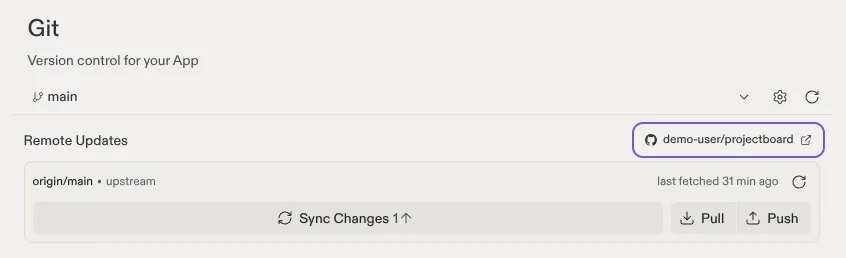
Files listed in .gitignore and changes you did not commit stay behind. Commit everything first. Then open the repository on GitHub. You should see package.json and the .replit file in the file list.
2. Or download a zip file
In the file tree, click the three-dot menu at the top and pick Download as zip. If a large project does not download, open the Shell and make the zip yourself. The file then shows up in the file tree, where you can download it.
zip -r project.zip .
3. Write down your secrets
Secret values, like API keys and passwords, never leave the project. Open Secrets (click Tools, then Secrets) and write down every name. DATABASE_URL is not there: it is in Tools, Database, Settings, under Connection string. Your computer and your new host need each one again. Copy the values by hand. Do not paste them into a chat with an AI tool.
4. Copy the database
The database does not come with the code. Apps from Replit Agent use PostgreSQL, with one database for development and one for production. The live data is in the production one. Its connection string is in the Database tool, under Settings.
Make a dump of it in the Shell, or on your own computer with PostgreSQL 16 or newer:
pg_dump "{{production connection string}}" -Fc -f backup.dumpDownload backup.dump from the file tree. Any PostgreSQL database can load it with pg_restore, for example a Supabase project you own.
Data people save after the dump is not in it. For the final copy, unpublish the app first in Publishing, so nothing new gets written.
What stays on Replit
| Part | Comes with the code? | What to do |
|---|---|---|
| Code | Yes | Push it with Git or download the zip |
| Secrets | No | Write down every name and copy each value by hand |
| Database | No | Copy it with pg_dump and load it with pg_restore |
| Files in App Storage | No | Download them and upload them to new storage |
| Logins with Replit Auth | No | Move them to another login service, for example Supabase Auth |
| The replit.app address | No | Point your own domain at the new host |
| Agent chat history | No | Write down what you still need |
Next: run the app somewhere else
With the code on GitHub, the step-by-step guides take it from there. Replit to Claude Code keeps the app on Replit and lets you edit it on your computer. Replit to own VPS and Replit to Vercel move the app too, with the database, logins and files going to Supabase.
Sources
- Replit docs: Manually copy a project to another workspace
- Replit docs: Version control
- Replit docs: Add secrets to environments
- Replit docs: Add a database
- PostgreSQL docs: pg_dump