


 Join us on Discord














Get the environment variables of a v0 app
The code of a v0 app goes to GitHub. Its keys stay in the Vercel project v0 publishes to. The Vercel CLI copies them to your computer, but in our test the first try brought one token and nothing else. These are the reasons we found.
1. Link the folder
In the project folder, log in to Vercel and link the folder to the project v0 published:
npm install -g vercel
vercel login
vercel link
vercel login shows a link. Open it and confirm. vercel link asks which project to use. It then creates .env.local, and in our test that file had one line: VERCEL_OIDC_TOKEN. The variables of the app were not in it yet. Check that .gitignore lists .env*. The one in our v0 project did.
2. Pull the variables
vercel env pull .env.local
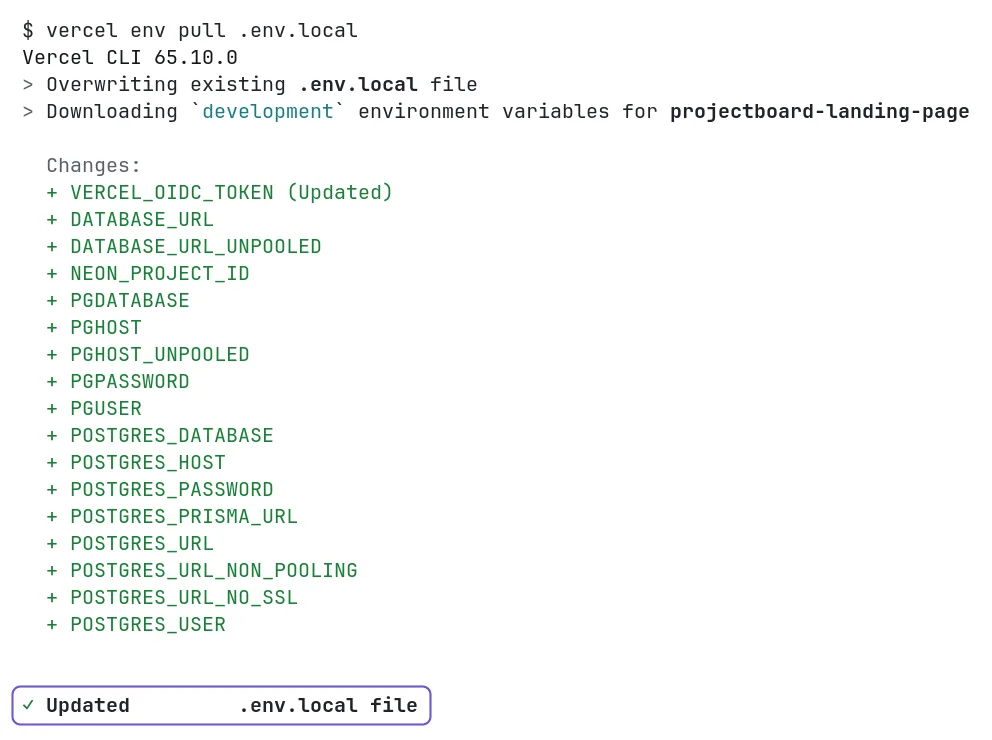
The CLI downloads the Development variables and lists the names it added. If the list is empty, open Settings, Environment Variables in the Vercel project and check two things:
- The variable is set for Development. Variables for Production and Preview only are skipped.
- The variable is not Sensitive. A Sensitive value cannot be read back, so it never reaches .env.local.
A database from Vercel Storage
When you add a database in Vercel Storage, the connect step sets its variables. In our test with Neon the form had Production and Preview ticked and Sensitive on, so vercel env pull got none of them. Ticking Development turned Sensitive off. The next pull brought DATABASE_URL and 15 more names.

AI features on localhost
v0 adds AI with the AI SDK and the Vercel AI Gateway, for example gateway("openai/o4-mini"). The gateway reads AI_GATEWAY_API_KEY. Without it, it uses the VERCEL_OIDC_TOKEN that vercel env pull wrote.
In our test the token reached the gateway, and the gateway answered 403: "AI Gateway requires a valid credit card on file to service requests." That holds for the free credits too, and the AI feature failed the same way in the v0 preview. Add a card to the Vercel team on its AI Gateway page, or the feature will not answer anywhere.
The OIDC token does not last. When AI calls stop working on your computer after a while, pull the variables again.
Or let an AI tool do it
Paste this into Claude Code or Codex in the project folder:
Install the Vercel CLI if it is missing and log me in with vercel login. Link this folder to my Vercel project with vercel link and ask me which project to pick. Then run vercel env pull .env.local. Check that .gitignore covers .env.local. List the variable names only. Do not print any value.
Both tools pulled the same 17 names in our test. Codex could not read the saved Vercel login from inside its sandbox and tried to log in again. After we told it the login was there, it asked to run each vercel command outside the sandbox.
Sources
- Vercel docs: vercel env
- Vercel docs: vercel link
- Vercel docs: Sensitive environment variables
- Vercel docs: AI Gateway
- Vercel community: Sensitive env var does not load locally