


 Join us on Discord














Deploy a Bolt app to Vercel
Vercel builds a Bolt app straight from GitHub. Once the project syncs with a repository, every push deploys again. The backend stays in Bolt Cloud or in your own Supabase project, so the app on Vercel only needs its keys.
1. Sync the project with GitHub
Click the GitHub icon in the top right corner of the project in Bolt and create a repository. Bolt makes it private and keeps it in sync both ways. The full steps are in Export a Bolt project to GitHub.
2. Import the repository in Vercel
Sign up at vercel.com. The easiest way is Continue with GitHub, so Vercel can see your repositories. Then import the repository. Vercel detects the framework.
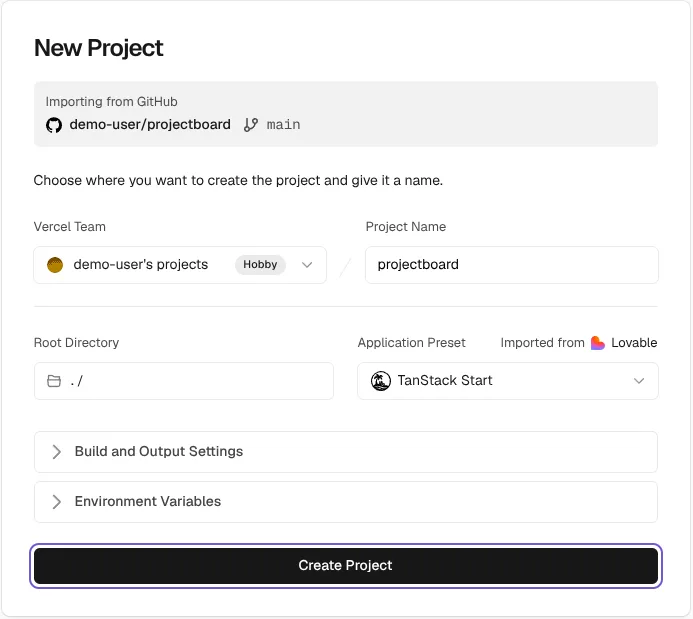
3. Add the backend keys before you deploy
Open Environment Variables on the import screen and add every name and value from your .env file. A Vite app reads them when it builds, so they have to be there before the first build. Then click Deploy.
Vite puts every value that starts with VITE_ into the code that runs in the browser. The address and the public key of the backend belong there. A secret key never does.
4. Fix the 404 on reload
A Bolt app is often a single-page app. Vercel does not know its routes, so reloading a page other than the home page gives a 404 error. Add a vercel.json file to the root of the project:
{
  "rewrites": [{ "source": "/(.*)", "destination": "/index.html" }]
}
Commit it and push. Vercel deploys again.
5. Change the login address
If people log in, login still sends them back to the Bolt address. For your own Supabase project, go to Authentication, URL Configuration. Set the Site URL to the Vercel address and add it to the Redirect URLs. For Bolt Cloud, change the same in the Authentication settings of the project in Bolt.
Or upload a zip with Vercel Drop
Vercel also shows how to deploy a Bolt project from a zip file with Vercel Drop. That is a one-time upload. GitHub deploys every change on its own, so use GitHub for an app you keep working on.
Keep editing in Bolt?
You can. Bolt syncs both ways, so changes from Bolt reach GitHub and Vercel deploys them. Pull before you edit somewhere else. If Bolt and GitHub change the code at the same time, Bolt keeps its version and overwrites GitHub.
Sources
- Bolt help center: GitHub integration
- Vercel docs: Vite on Vercel
- Vite docs: Env variables and modes
- Vercel guide: Deploy a Bolt.new app with Vercel Drop
- Supabase docs: Redirect URLs