


 Join us on Discord













Deploy every GitHub push to your own server
On Vercel and Cloudflare Pages a push to GitHub deploys your app on its own. On your own server nothing happens when you push. Something on the server has to hear about the push, pull the code, build it and restart the app. GitHub tells it through a webhook.
How it works
You give GitHub an address on your server and a secret. On every push GitHub sends a short message to that address, signed with the secret. The server checks the signature, pulls the new code, builds it and swaps the running app for the new one.
What the server needs
- An address with HTTPS that takes the message from GitHub.
- A check of the X-Hub-Signature-256 header, so a stranger cannot start a deploy.
- A build that runs on the server and stops on an error, with the old app still running.
- A log, so you can see why a deploy failed.
You can write this yourself: a small web service, a deploy script and a service manager that restarts the app. Or use a tool that has it built in. PanelAlpha Engine, which our own VPS guide uses, creates the hook when your AI tool asks for it and gives you the address and the secret.
Add the webhook in GitHub
Open the repository, then Settings, Webhooks, Add webhook:
| Field | Value |
|---|---|
| Payload URL | The address on your server |
| Content type | application/json |
| Secret | A long random string, the same one your server checks |
| Which events | Just the push event |
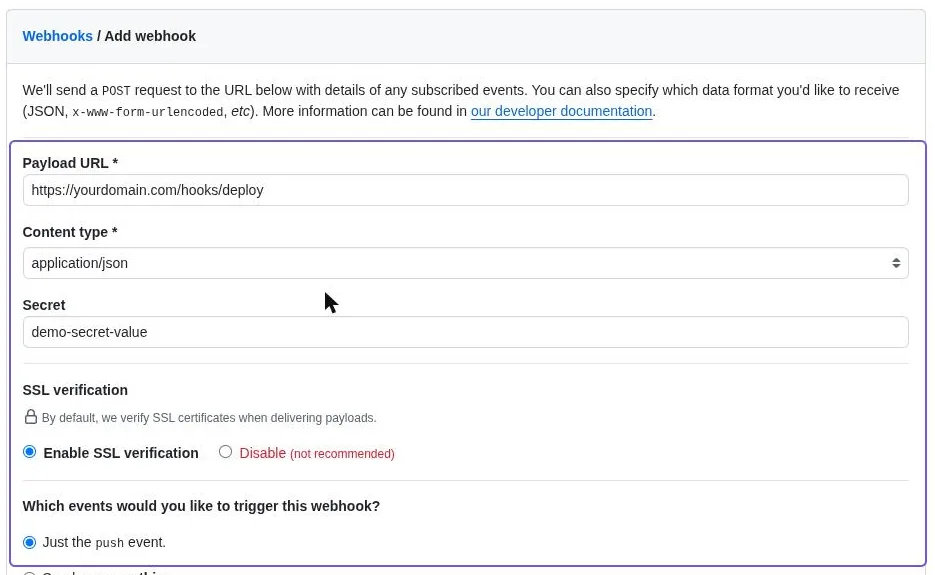
Leave SSL verification on. Turn it off only if your server has no trusted certificate yet, and turn it on again when it has one. Without it, GitHub cannot be sure it is talking to your server.
With PanelAlpha Engine
Paste this into Claude Code, Codex or Cursor in the project folder:
Set up a push-to-deploy hook for this project. I'll be pushing from GitHub.
It gives you the address and the secret for the table above. The secret shows only once, so copy both before you close the chat.
Check that it works
Push a small change. In GitHub open Settings, Webhooks, your webhook and Recent deliveries. You should see the push with a green check. GitHub lists the deliveries of the last 3 days.
A red mark means the server did not answer or said no. Open the delivery to see the answer of the server, fix it and click Redeliver. GitHub does not try a failed delivery again on its own.
Sources
- GitHub docs: Creating webhooks
- GitHub docs: Validating webhook deliveries
- GitHub docs: Viewing webhook deliveries
- GitHub docs: Redelivering webhooks
- Vercel docs: Deploying Git repositories
- Cloudflare docs: Pages Git integration